NKSDeploy
Zero-downtime deployment tool for Nette applications: the new version is built next to the old one, switched over in one step and rolled back automatically on error.
NKSDeploy is a zero-downtime deployment tool for Nette applications. Deploying a new version of a Nette website often looks like this: run git pull on the server, then composer install, build the styles and scripts, clear the cache. All that time the site runs on half-updated files. A visitor gets a 500 error because the libraries have not finished installing, or a page with the old template and new code. And when the new version fails, going back means the same steps in reverse, in a hurry and under pressure. It runs from the command line, deploys without downtime and, when needed, rolls back to the previous version with one command.
Why not FTP or git pull on the server
FTP uploads and git pull in production share the same flaw: they change the files the site is running from. Generic deployment tools solve this, but they know nothing about Nette. They do not know that the DI container and Latte templates should be compiled before launch, that Doctrine proxy classes are generated after entity changes, or that OPcache must be cleared after the switch. Each project then adds these steps itself, each a little differently.
NKSDeploy has them built in. Configuration lives in a NEON file, a format Nette developers already know, and the tool validates it against a schema before use.
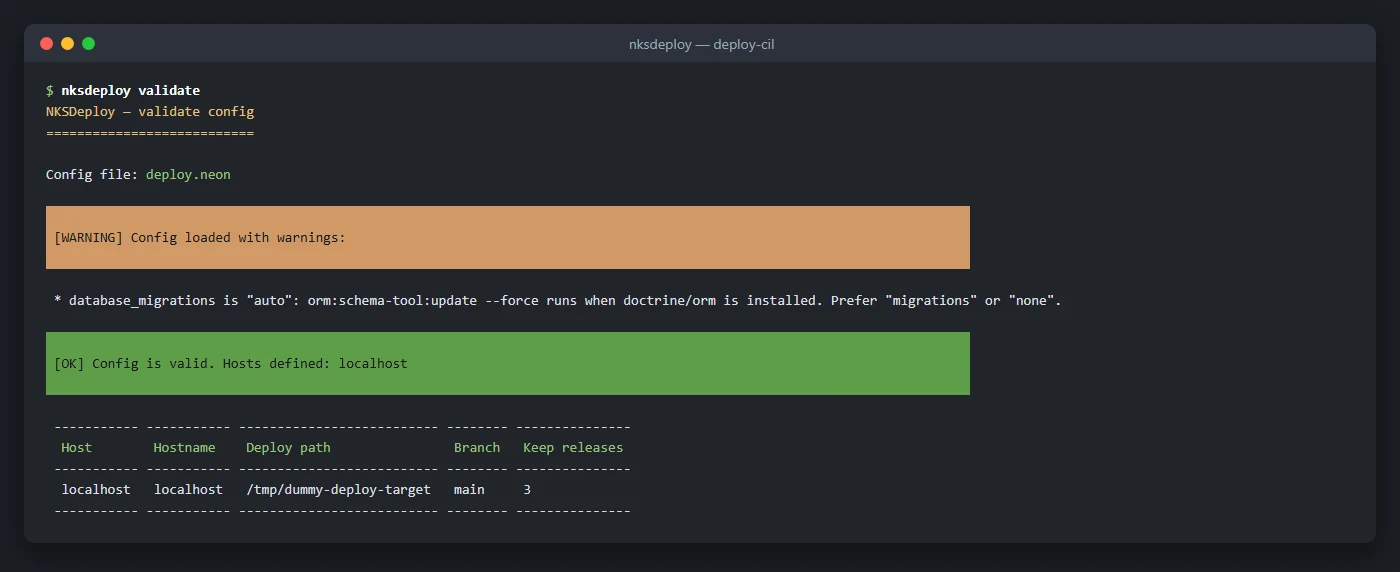
nksdeploy validate command on a practice project: the configuration passed, with one warning about automatic migrations.New version next to the old one, switched in one step
Each deployment is built in its own directory next to the current one. The code is fetched, dependencies installed, the front end built, the cache and database prepared. Meanwhile the site keeps running from the old version and sees none of it. Only when the new version is complete does the site switch to it in a single filesystem operation. There is no moment when the site runs on a half-finished copy.
Data that must survive a deployment lives in a shared directory and is only linked into each version: local configuration, logs, sessions and uploaded files. Users stay signed in after a deployment and uploaded images do not disappear.
What the tool does for the developer
- Pre-deployment checks. Before the first step, it verifies that the repository has no uncommitted changes, that changed PHP files pass a syntax check, that the DI container compiles, that the Doctrine schema matches and that a Vite manifest exists. If anything fails, the deployment does not start at all.
- Nette and Doctrine steps. Clearing the cache, generating proxy classes, database migrations and precompiling the DI container and Latte templates all happen before the switch. The first visitor after a deployment does not wait for the cache to build.
- Skipping unnecessary work. When
composer.lockhas not changed, dependencies are not downloaded again but taken over from the previous version through hard links. The front-end build runs only when styles, scripts or their configuration changed. A routine deployment of a small fix does not download the whole world. - After the switch. The tool gracefully restarts PHP-FPM, clears OPcache and deletes old versions beyond the configured count.
- Lock. Two deployments to the same server cannot run at once; the second one hits a lock.
Rollback, automatic and manual
After the switch, the tool asks the application whether it is alive: it calls the configured health-check URL up to three times, two seconds apart. If the application does not respond, it rolls the site back to the previous version, restarts PHP-FPM, records the rollback in the history and reports it to Sentry, if configured.
Manually, you can roll back to the previous version or to any of the kept versions by its label. A rollback is the same switch as a deployment, so it takes a moment and needs no new download or build. The status command shows which version is running and which are available; history lists the deployment history.
Hooks for custom steps
Custom steps can be inserted at six points in the run: before deployment, before the switch, after the switch, after completion, on rollback and on error, as well as before or after any built-in step. A hook is a PHP function or a shell command that runs on the server or on the machine the deployment starts from. A hook can run a command on the server, write to a log or touch the configuration. Typical uses are turning a maintenance page on and off, posting to the team chat after a successful deployment, updating the database schemas of several customers of one application, or announcing a rollback. The tool can send the deployment result by email, to Slack or through a generic webhook.
Safe dry runs, all in one file
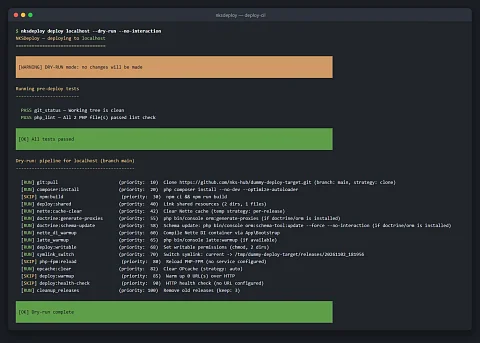
--dry-runmode lists the steps that would run and, for each one, whether it would run or be skipped.- The connection to the server uses SSH with a key and SFTP, written entirely in PHP, so it needs no extra PHP extension.
- It can also deploy to the same machine the tool runs on.
- Code reaches the server as a clone with git history or as an archive without it.
- A monorepo with several applications is handled by an option that sets the application's subdirectory.
- The tool ships as a single executable PHAR file and can complete server names on the command line.
Getting started in four commands
The init command generates a configuration template, validate checks it, setup prepares the directories on the server and deploy deploys. For the web server, point the document root at the current version's directory once; the tool takes care of the rest.
Who it is for
- Developers and companies running Nette applications on their own Linux servers with PHP-FPM.
- Projects with Doctrine and migrations, where deployment means more than copying files.
- Applications whose operators cannot afford error pages during deployment, such as online shops and booking systems.
- Teams that want the same deployment process for test and production servers, including several servers in one configuration.
Project status
NKSDeploy is in production; the current version is 0.2.0 from October 2026, and we use it to deploy our own Nette applications. It requires PHP 8.3 or newer, Composer and SSH key access to the server. The code is checked by PHPStan at level 8 and covered by PHPUnit tests. The tool is built for Nette and a server with PHP-FPM and SSH access; shared hosting without SSH is not enough.
Interested in using it?
Want NKSDeploy for your Nette project, or help setting up deployments with it? Write through the enquiry form or to dev@nks-hub.cz.