NKS SQL Backup
Web app that schedules and monitors MySQL and MariaDB backups from multiple servers and stores them on disk, SFTP or S3, optionally encrypted.
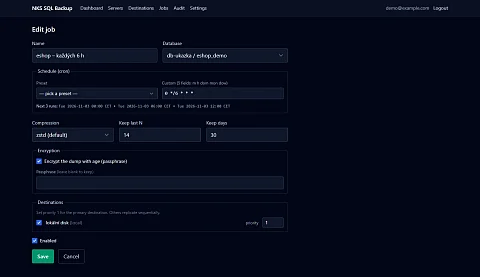
NKS SQL Backup is a web application for MySQL and MariaDB backups from multiple servers. Database backups tend to be done differently on every server. Here a cron script someone wrote two years ago, there a manual mysqldump before a bigger change, elsewhere nothing. That a backup did not run is usually discovered only when it is needed. NKS SQL Backup schedules and runs the backups from all servers, stores them in several places and checks whether they succeeded.
Instead of scripts scattered across servers
A cron script backs up only the server it runs on, and nobody sees its result. Backups from different machines each sit somewhere else, with different compression and a different rule for deleting old copies. When a script quietly stops working, for example after a database password change, nobody is warned.
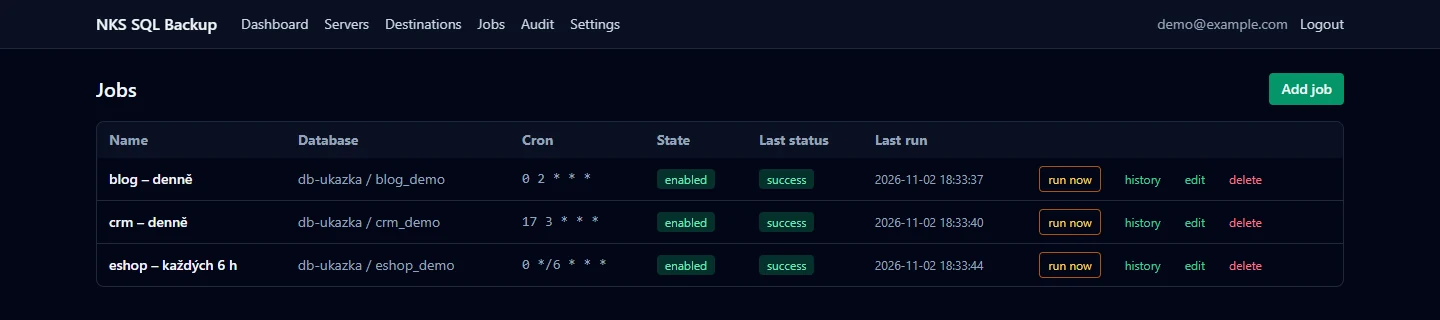
NKS SQL Backup keeps everything in one place. The overview shows which jobs ran, which failed and how much space the backups take. Servers, databases, schedules and destinations are set up in the web interface; no extra service has to run on the backed-up servers.
What the application does
- Multiple servers and databases. Each job has its own schedule in cron format. The schedule can be picked from presets (daily, every six hours, weekly, monthly), and the interface immediately shows when the next runs will happen.
- Two ways to connect. The application connects to the database directly over the network or through SSH. In the second case, the backup runs on the target server itself, is compressed there and travels over the network already shrunk. SSH and SFTP connections verify a pinned server key fingerprint.
- Connection test and database discovery. For a new server, one button checks the connection and another lists the databases on it, so nothing has to be typed in by hand.
- Compression and encryption. The default compression is zstd; gzip, zip or none are also available. A backup can be encrypted with age using a passphrase, so nobody can read it without the passphrase, even if it leaks from the storage.
- Multiple destinations. A backup is saved to a local disk or mounted network storage and copied from there to a server over SFTP or to S3-compatible storage. A failure of the primary destination fails the job; failures of additional destinations are reported as warnings.
- Deleting old copies. Each job has its own rule: keep the last N backups and delete those older than a chosen number of days.
- History and logs. Each run has a result, a size and a run log. A backup can be downloaded straight from the interface, and a job can be started immediately with the "Run" button without waiting for the schedule.
- Notifications. After a successful or failed run, the application can send a webhook. Settings have a test button to make sure the message arrives.
A backup you can trust
Backups are processed as a stream: the database dump goes straight into compression and encryption, with no uncompressed copy on disk. The file gets its final name only once it is fully written. An interrupted backup therefore never passes for a finished one.
The scheduler watches for overlaps. A job that is still running does not start a second time, and the number of concurrent backups is capped so the night window does not overload the database servers. When the application restarts in the middle of a backup, the interrupted run is closed as incomplete after startup and does not stay stuck in the "running" state. If the internal scheduler stopped working, the container reports itself as unhealthy and a watchdog script on the host restarts it within a few minutes.
An overview instead of digging through logs
The home page shows the latest runs and, for each destination, the number of files, used and free space and the total size of the backups. Pages refresh by themselves, so you can see right away which backup is running and how it ended. An audit log records who changed what and when.

Access and sensitive data
Users sign in to the interface through single sign-on (OpenID Connect), and only members of a designated group are let in. Database and destination storage passwords are encrypted in the application's configuration. A database account without write privileges is enough for backups. A direct connection installs nothing on the backed-up server; backups over SSH need the mysqldump and zstd tools on it.
Deployment
The application ships as a Docker container and is a single Go program, including the scheduler and web interface. It keeps its configuration in an SQLite file database. Besides the web interface, it has commands for scripted creation of servers, databases and jobs, so dozens of databases can be set up with one script.
Who it is for
- Companies and administrators with MySQL or MariaDB databases spread across several servers who want backups in one place.
- Website operators with several databases on one server, where each is backed up at a different hour so the backups do not compete for performance.
- Anyone who needs an off-site copy of backups, on a server over SFTP or in S3 storage.
Project status
NKS SQL Backup is in production and backs up our project databases every night. The interface does not yet include restore: you download the backup and load it into the database with the usual tools. The interface is in English and supports MySQL and MariaDB.
Interested in using it?
Want your database backups under control? Write through the enquiry form or to dev@nks-hub.cz.