gmail-cli
Gmail from the command line with machine-readable output for scripts, CI and AI assistants. TypeScript, MIT licence, code on GitHub.
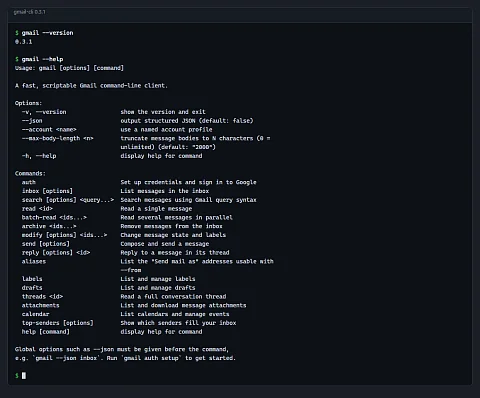
gmail-cli is a command-line tool for Gmail with machine-readable output. If you want to process Gmail with a script, you have two options and neither is convenient. The web interface is made for a person with a mouse, and the Gmail API requires your own program, OAuth sign-in, token refresh and rate-limit handling. gmail-cli does that work for you: it is a single gmail executable that reads, searches, sorts and sends mail from the terminal and can return every result as JSON. It suits shell scripts, cron jobs, CI steps and an AI assistant that drives the command line.
Why a command line and not another MCP server
The project started as a replacement for a Gmail MCP server. An MCP server is available only from a client that supports MCP, whereas a terminal command can be called by anything: bash, PowerShell, a task scheduler, a CI pipeline or a language model with shell access. Output goes straight to jq, a file or another program, with no layer in between.
Compared with your own script on top of Google's official libraries, you skip writing sign-in and error handling. gmail-cli does not use Google's SDK at all; OAuth and the REST API calls are written directly in the project on top of fetch.
What the user gets
One file, no runtime
Each release contains prebuilt binaries for Windows x64, macOS on Intel and Apple Silicon, and Linux x64 and ARM64. The Bun runtime is embedded in them, which is why they are 89 to 115 MB, but the target machine needs no Node.js, Python or anything else. The install script downloads the right binary from the latest release, verifies its SHA-256 hash against the published SHA256SUMS file, saves it to a user directory and adds that directory to PATH.
JSON for every command
The --json switch works with all commands, so output does not have to be parsed from text meant for human eyes. Message bodies are truncated to 2,000 characters by default so that a listing from a large mailbox does not flood the script or the language model's context; --max-body-length 0 turns truncation off.
Bulk changes by the thousand
Archiving, labels, read and unread, and moving to trash go through the batchModify method, which handles up to 1,000 messages in a single API call. Cleaning out hundreds of newsletters is one command, not hundreds of requests. gmail-cli deliberately cannot delete permanently: modify --trash only moves messages to the trash, from where they can be restored.
Replies stay in the thread
The reply command sets the In-Reply-To and References headers, the thread ID and a subject with "Re:", so the reply lands in the original conversation for the sender and in your sent mail. With --all it replies to everyone. --from picks the sending address from the list of verified aliases printed by gmail aliases; without it, the reply goes out from the alias the original message was sent to. A shared support address thus replies under its own name, not the account's main address.
Multiple mailboxes and a calendar
The global --account <jméno> switches to another account with its own token, so one script can handle both a personal and a work mailbox. The same tool works with Google Calendar: it lists calendars and upcoming events, creates an all-day or timed event with a location, description and reminder, and deletes an event.
It handles outages and limits itself
An expired access token is refreshed before the request without user intervention. After a 429 response or a 5xx error, gmail-cli resends the request, at most four times in total, waiting roughly half a second, one second and two seconds between attempts. A nightly job therefore does not fail because of a brief overload on Google's side.
How sign-in works and where the keys are kept
gmail-cli has no shared OAuth client. It talks to Gmail through the user's own Google Cloud project, so access to the mailbox stays under the user's control. The gmail auth setup wizard walks step by step through creating the project, enabling the Gmail API, configuring the consent screen and creating a Desktop app client; it then loads the downloaded JSON by itself.
The sign-in itself is the standard flow for installed apps: the browser opens a Google page and the response is received by a temporary server on 127.0.0.1 with a random port, protected with PKCE S256. The tool requests the gmail.modify, gmail.send, calendar.events and calendar.calendarlist.readonly scopes, not full mailbox access. It stores client credentials and tokens only in %APPDATA%\gmail-cli\ on Windows, or ~/.config/gmail-cli/ on macOS and Linux, where the files get 0600 permissions. Neither the repository nor CI contains any secrets.
Usage: gmail [options] [command]

Commands:
  auth                         Set up credentials and sign in to Google
  inbox [options]              List messages in the inbox
  search [options] <query...>  Search messages using Gmail query syntax
  read <id>                    Read a single message
  batch-read <ids...>          Read several messages in parallel
  archive <ids...>             Remove messages from the inbox
  modify [options] <ids...>    Change message state and labels
  send [options]               Compose and send a message
  reply [options] <id>         Reply to a message in its thread
  aliases                      List the "Send mail as" addresses usable with
                               --from
  labels                       List and manage labels
  drafts                       List and manage drafts
  threads <id>                 Read a full conversation thread
  attachments                  List and download message attachments
  calendar                     List calendars and manage events
  top-senders [options]        Show which senders fill your inbox
Output of gmail --help from version 0.3.1, without the switches described above and two general lines.
Where it is used
- A morning overview of unread mail in a script:
gmail --json search is:unreadreturns an array of messages from whichjqtakes the ID and subject. - Mailbox cleanup: a search result by sender is passed to the
archivecommand and a hundred newsletters leave the inbox at once. If you do not know who sends you the most mail, asktop-senders. - Attachments to a folder:
attachments downloadsaves all attachments of a message, such as invoices that an accounting script then processes. - CI notifications:
sendaccepts the message body from standard input, so a pipeline step sends an email about the build result in one line. - Support from a shared address: an AI assistant or a person prepares a reply in a file and
reply --fromsends it in the thread on behalf of support.
Project status
The first version, 0.1.0, came out in May 2026 with the setup wizard and basic commands for reading, sorting, drafts and attachments. Version 0.2.0 from June added calendar commands and install scripts, and 0.3.0 from October added replying in threads and sending from aliases. The latest release is 0.3.1 from 23 October 2026, which only updated dependencies.
The binaries are not signed yet, so Windows SmartScreen reports an unknown publisher on first run and you have to choose "More info" and "Run anyway". Signing through the SignPath Foundation programme is prepared in the build pipeline but not yet enabled. Tests run in CI against a mocked fetch; the tool is tested with a real account manually.
Getting started
# macOS and Linux
curl -fsSL https://raw.githubusercontent.com/nks-hub/gmail-cli/main/install.sh | sh

# Windows (PowerShell)
irm https://raw.githubusercontent.com/nks-hub/gmail-cli/main/install.ps1 | iex

gmail auth setup
gmail auth login
gmail auth status
If you do not want the script, download the binary manually from Releases and verify it against SHA256SUMS. To build from source, run bun run build with Bun 1.3 or later.
Source code
The code is on GitHub in the nks-hub/gmail-cli repository under the MIT licence. It is written in TypeScript, and the only runtime library is commander for argument parsing. The package is not on npm or any other registry; the name gmail-cli on npm belongs to a different, older project unrelated to this one.