NKS WebDev Console
Local PHP web development environment for Windows, macOS and Linux: Apache, MySQL, a separate PHP version per site, HTTPS, Redis and Cloudflare tunnels. Controlled from a window, the command line or over MCP.
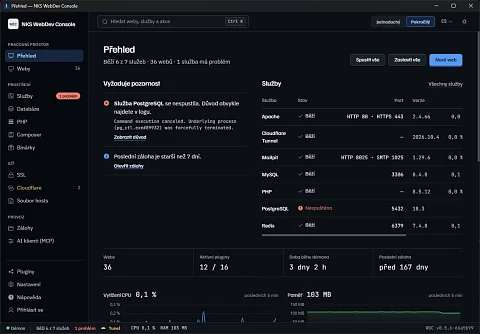
NKS WebDev Console is a local PHP development environment for Windows, macOS and Linux. A PHP web developer commonly has dozens of projects on one computer. One needs PHP 7.4, another 8.3, a third Redis and HTTPS on its own domain, and all of them want a database. NKS WebDev Console manages this environment from one place: it runs Apache, MySQL or MariaDB, Redis and Mailpit, issues certificates for .local and .test domains and writes them to the hosts file itself.
Why MAMP, XAMPP and Laragon were not enough
Each of the bundles commonly used for this has its limits. WampServer and Laragon run only on Windows, MAMP PRO is paid and only for Windows and macOS, and XAMPP ships one PHP for all sites. Anyone working on two operating systems, or needing a different PHP version per site, ends up assembling the environment from several tools. WebDev Console offers the same controls on all three systems and selects the PHP version for each site separately. It is free under the MIT licence.
What developers get
- Its own PHP for each site. A site keeps its PHP version and its own settings: memory, time limits, upload size, Xdebug, OPcache, extensions and Apache Fcgid timeouts. An old project on PHP 7.4 and a new one on 8.3 run side by side without switching.
- HTTPS without manual clicking. Certificates are signed by a local mkcert authority, so the browser treats a domain like
my-app.localas secure. The application adds the hosts file entry itself. - Moving from MAMP PRO with one command. The import reads the MAMP PRO SQLite database, recreates the virtual hosts, copies certificates and migrates the databases. The
wdc migrate mampcommand first only shows what it would do; the actual migration runs with the--applyoption. It has been tested on 17 sites and 66 databases. - Services as plugins. Apache, PHP, MySQL, MariaDB, SSL, Mailpit, Redis, Node, Caddy, Cloudflare and the hosts file editor are loaded as separate .NET libraries, and each plugin runs in its own load context, so two plugins can use different versions of the same library. The official plugin repository has 16 of them, plus Nginx, PostgreSQL, Composer and two for deployment; they are installed at runtime from the catalogue without reinstalling the application.
- A tunnel out of your computer. It controls Cloudflare tunnels, DNS records and routing through
cloudflared, so a work-in-progress site can be shown to a client at a public address. - Backups. It backs up sites and databases and restores them from backups. The dashboard warns when the last backup is older than seven days.
- One administrator prompt. On Windows the application asks for administrator rights once at startup and then edits the hosts file without further prompts.
Window, command line, API and agent
There are four ways into the environment. The application window is in Czech and English and has a simple and an advanced mode. The wdc command is part of every installer and talks to the running daemon; wdc sites create --domain my-app.local --php 8.3 --ssl creates a site with PHP 8.3 and a certificate, wdc doctor runs 13 health checks, and the --json option gives output for scripts. The REST API is protected by a token that the daemon regenerates at every start, and the API is described in OpenAPI format.
The fourth way is an MCP server with 72 tools, which is part of the installation and is turned on with one switch. Claude Code, Claude Desktop or Cursor use it to create sites and databases, start services, issue certificates, and manage plugins, backups, tunnels and deployments. Deletion and other irreversible steps must be confirmed by a person in the application or allowed in advance by a rule. Every call is logged, and the Activity tab shows a 24-hour timeline, the most used tools and response times; the log can be exported to CSV. With the --readonly option the server leaves out every tool that changes something, which leaves 33. To hand a remote server to an agent in the same way, there is RemoteCmd.
How the application is built
The work is done by a .NET 9 daemon on ASP.NET Core; the window is Electron 44 with Vue 3. The daemon ships self-contained, so the .NET runtime does not have to be installed separately. Plugins generate virtual host, php.ini and tunnel configuration from templates. The repository has over 595 xUnit tests, and GitHub Actions builds every release for all three systems.
The project consists of four public repositories: the application with the daemon and command line, the official plugins, prebuilt binaries (PHP, Apache, Nginx, Caddy) and a FastAPI catalogue service from which the daemon downloads available versions.
Who it suits
- Developers who maintain older sites on PHP 7 while writing new ones on PHP 8.
- Teams where some people work on Windows and some on a Mac and want the same environment and the same commands.
- MAMP PRO users who want to move sites and databases all at once, not by hand one at a time.
- Developers who hand routine work to an agent and want to see every step it takes.
Project status
Since April 2026, 46 versions have been released; the latest is 0.5.6 from 28 October 2026. A version number below 1 means the application is still changing quickly. The macOS installer is for Apple Silicon only, and on macOS and Linux the user has to add the wdc command to the path manually once. The plugin repository does not yet mark the PostgreSQL and deployment plugins as stable.
Download
Installers are on GitHub Releases; the application is not in any app store:
- Windows 10 and 11 (x64): an NSIS installer that adds
wdcto the path, or a portable version, - macOS 14 and later on Apple Silicon: DMG or ZIP,
- Linux with glibc 2.28 and later (Ubuntu 22.04, Debian 12, Fedora 38): AppImage.
To build from source, use .NET SDK 9 and Node.js 20 with dotnet build and npm run dist.
Source code
The code is at github.com/nks-hub/webdev-console under the MIT licence, the plugins at nks-hub/webdev-console-plugins.