RemoteCmd
Commands, files and screenshots on computers behind NAT and a firewall through a relay, with no open port. Controlled via a REST API or from an AI agent over MCP.
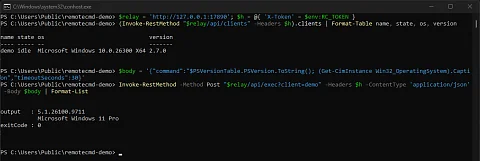
RemoteCmd is a tool that runs commands, transfers files and takes screenshots on computers behind NAT and a firewall. Typical cases are a build machine in the office, a computer at a customer's site behind their router, a test laptop on another network: each of them occasionally needs a command run, a log downloaded or a file uploaded, and none of them is reachable from the internet. RemoteCmd solves this with a relay in the middle. The computers check in with it themselves over outgoing HTTP every 800 ms, so no port has to be opened on them, and scripts send them commands through a REST API or AI agents through MCP.
No open port and no remote desktop
SSH needs the target machine to be reachable from outside, which means an open port, router forwarding or a VPN. Remote desktop is operated with a mouse, and neither a script nor an agent can work with it. RemoteCmd reverses the direction of the connection: the computer always opens it, not whoever controls it. It therefore works behind NAT, behind a corporate firewall and on mobile connections with no public address at all. The command result comes back as text with an exit code, which both a script and a language model can work with.
What RemoteCmd does
- Commands on any machine. It runs PowerShell or bash on a paired computer and returns the output and exit code. A timeout is set per command.
- Files in both directions. It uploads and downloads files, up to 200 MB over REST and up to 20 MB directly in the response over MCP.
- Screenshot. It captures the remote computer's screen as PNG so the agent can see what is happening on the machine. A client running as a Windows service runs in session 0 without a desktop, and the response says so directly instead of returning a black rectangle.
- Adding a machine with one command. The dashboard creates a one-time code and a ready-made install command for Windows, Linux or macOS. The script downloads the client for the right system and processor, exchanges the code for the machine's own 256-bit key, pins the relay certificate and starts the client as a service. Running it again without a code updates the client and keeps its settings.
- An agent at a single address. Claude Code connects with
claude mcp add --transport http remote-cmd https://relay:7890/mcp. The agent gets tools for listing machines, running a command, writing and reading a file, and taking a screenshot. - Everything in one place. The dashboard, in the form that is in the code after version 2.7.0, shows machines with their system, account and client version, a command line and a log of all commands with output, transfers, connections and rejected requests, with search and filters.

--dashboard switch: connection state, number of relay polls and the commands that arrived for execution.How the relay works
The relay listens on port 7890 for machines, scripts and agents. The dashboard runs on port 7891 and only on localhost, so nobody can reach it from outside. Scripts send commands to /api/exec, files to /api/upload and /api/download, screenshots to /api/screenshot; the token goes in the X-Token header. When only one machine is connected, the client parameter can be omitted.
An agent signs in through OAuth with PKCE. It sees a six-digit code in the browser, and the same request appears on the dashboard. A person compares the codes and approves access; the agent then receives its own credential, which can be revoked at any time.
The relay and the client are written in C# on .NET 9 and ship as self-contained executables for Windows, Linux and macOS on x64 and arm64, with no runtime to install. The install script registers them as a Windows service, a systemd unit or a launchd job. For Windows 7 there is a client on .NET Framework 4.8 that uses tokens instead of pairing, and for rooted Android a Kotlin client that runs commands through su.
Security in layers
The connection is protected by TLS with the relay's own certificate, which paired computers pin and any other is rejected. Every command, result and file is also encrypted with AES-256-GCM using that computer's key, so the content stays protected even where the relay runs without TLS. The pairing code has 50 bits, is valid for 15 minutes, expires after five failed attempts and authenticates an ECDH key exchange. The issued key therefore never crosses the network in usable form, not even over unencrypted HTTP.
- With its key, a machine can only collect work and reply to it. It cannot send commands to other machines, list them or impersonate another machine, because the key determines its identity.
- The relay stores only token hashes and derived keys, the settings file is readable only by its owner, and tokens never appear on the command line or in the service definition.
- Anyone who enters a wrong token, code or password ten times in a minute is locked out for five minutes.
- The dashboard rejects a foreign
Hostheader, so it cannot be abused through DNS rebinding, and it can optionally be protected by a password. Without a password, anyone with a session on the relay machine can open it.
Where it fits
- Managing several computers at customer sites where router settings cannot be changed.
- Build and test machines on which a CI script runs commands and downloads results.
- An agent debugging an application on another computer: it starts it, reads the log and takes a screenshot, and a person on the dashboard sees each of its steps.
For working with a local development environment, the agent also has an MCP server in NKS WebDev Console. When you need to use a USB device directly from another computer rather than just run commands, there is NKS UsbShare, which can also be controlled through MCP.
Project status
The latest release is 2.7.0 from 7 October 2026; it ships the relay and the client for six system and processor combinations, the .NET Framework 4.8 client and a debug APK for Android. The MIT licence was added to the repository on 10 October 2026, after that release. The redesigned single-page dashboard with a pairing wizard is so far only in the code and will ship with the next version.
Getting started
On Windows the relay is installed with a single command in PowerShell run as administrator; on Linux and macOS like this:
curl -fsSL https://raw.githubusercontent.com/nks-hub/remote-cmd/main/install.sh | sudo sh -s -- serverThen open http://localhost:7891 on the relay machine and use the pairing button to create a code for the first computer. Ready-made packages for all systems are in GitHub Releases.
Source code
The code is at github.com/nks-hub/remote-cmd under the MIT licence.