Rybbit Mobile
Unofficial client for Rybbit web analytics on Android and iOS. Traffic, sessions, goals, errors and Core Web Vitals from a self-hosted server or Rybbit Cloud on your phone.
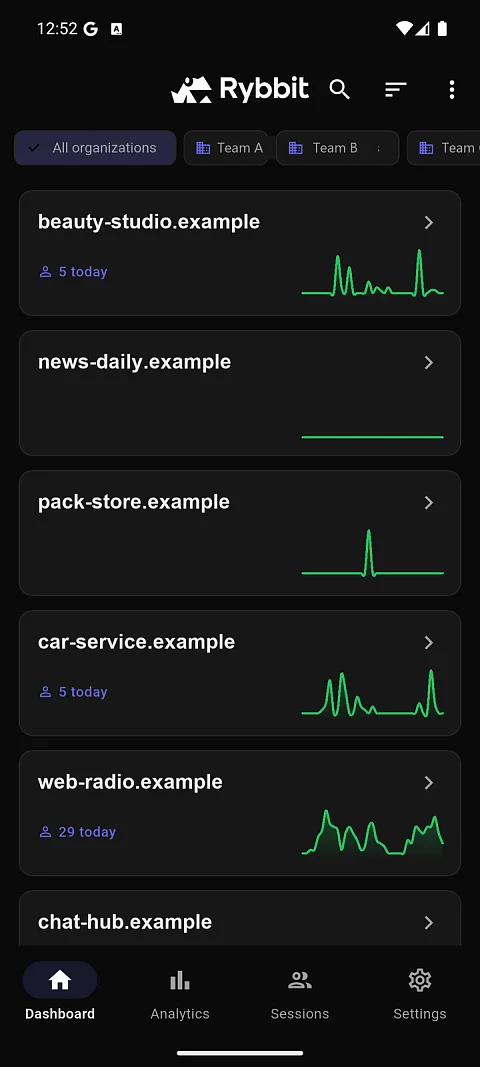
Rybbit Mobile is an unofficial client for Rybbit web analytics on Android and iOS. Anyone who runs several websites needs to know quickly whether people are arriving after an article goes out or a campaign starts, where they came from, and whether an error has appeared on some page. At a computer, the analytics web dashboard shows this. Rybbit Mobile shows the same on an Android or iOS phone, whether the numbers come from your own server or from Rybbit Cloud.
Analytics from your own server, not a third-party cloud
Rybbit is open-source, cookieless web analytics that you can run on your own server. Someone who moved to it from Google Analytics to keep visitor data in their own hands does not want to go back to a third-party service just to use a phone. Rybbit Mobile therefore connects only to the server the user enters and reads the data directly from it. The app has no intermediary and no statistics storage of its own.
It is an unofficial client. Rybbit is developed by the rybbit-io team; this app is not affiliated with it and talks to its public API. It works with Rybbit 1.0 and later.
What you see on the phone
- All sites on one screen. The overview shows today's visitor count and a small chart for each site. Sites can be filtered by organisation, so work and personal projects do not get mixed up.
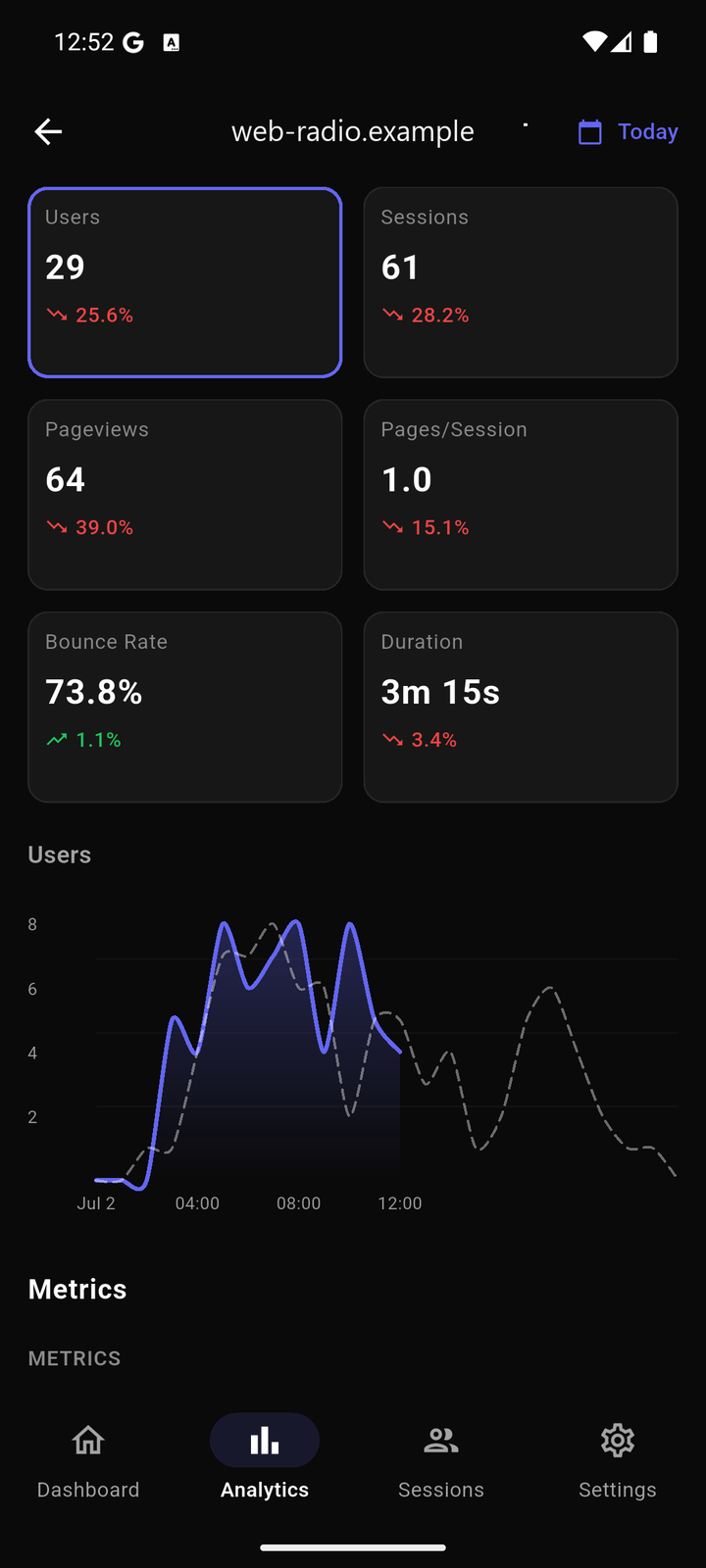
- Comparison with the previous period. Time-series charts draw the current period as a solid line and the previous one as a dashed line. They switch between users, sessions, pageviews, pages per session, bounce rate and session duration. The period can be today, yesterday, 7 days, 30 days, a year, or a custom range.
- Where people come from. Top pages, referrers, countries, browsers, operating systems, device types and screen resolutions. The data can be narrowed by a filter on country, browser, operating system, device, referrer or URL.
- Site speed as visitors see it. Core Web Vitals (LCP, CLS, FCP, TTFB and INP) rated good, needs improvement and poor, with trends over time and breakdowns by page, country, device, browser and operating system.
- Conversions. Custom events with counts and properties, outbound links, goals by URL or event (which can also be created and edited), and funnels with the drop-off at each step. Plus user journeys through the site and retention, that is, how many people come back.
- Individual visits and errors. A session list with country, browser and entry page, a detail view with an event timeline, identified users with their properties, and an event viewer from session replay. JavaScript errors are shown with the number of occurrences and affected sessions.
- Administration without a computer. Site tracking settings, including excluded IP addresses and countries, and the list of organisation members.
How the app is built
On the login screen you enter the Rybbit server address and either an email and password or an API key. A login with email is kept as a session cookie; Rybbit Cloud is accessed with a key. Apart from the server address and the login, the app stores nothing; statistics are loaded from the server every time.
It is written in Flutter 3.38 and Dart 3.10. Riverpod holds state, go_router handles navigation, Dio with cookie management does networking, and fl_chart draws the charts. Data models are generated by Freezed. The code is split by feature (overview, analytics, sessions, goals, funnels, performance and more), and each feature has its own API, state and view layer. A new Rybbit feature is added as another module without touching the others.
The interface is available in 11 languages: Czech, English, German, Spanish, French, Italian, Japanese, Korean, Polish, Portuguese and Chinese. The theme is dark, light, or follows the system. Another language is added with a single ARB file.
Who it is for
- An administrator who runs Rybbit for several clients and needs to check between meetings that no site has dropped to zero.
- A content author who watches live visitors and referrers after publishing an article.
- A developer who keeps an eye on JavaScript errors and Core Web Vitals after a deployment without opening a laptop.
What the app sends
Login credentials stay on the phone and go only to the Rybbit server the user configured. In addition, the official build reports anonymous usage statistics to the publisher's own Rybbit instance: which screens are opened and whether login succeeded, via Cloud or a self-hosted server. It does not send the server address, the account or data from the tracked sites. Reporting is on by default and is turned off in Settings, Privacy section; turning it off also deletes the anonymous identifier. Crash reporting through Sentry is included in the app only when enabled in the build configuration.
Project status
The current version is 1.0.3 from 13 October 2026, available on Google Play for Android 7.0 and later. The code is ready for iOS 13 and later, but there is no App Store build, so anyone who wants it there has to build and sign it themselves. A new version appears in the store only after Google's review, usually within two days.
Downloads
- Android: Google Play, listed in the store as Rybbit analytics (Unofficial).
- iOS: not in the App Store yet; build from source with
flutter runafterflutter pub getand code generation withbuild_runner.
Rybbit Mobile is not our only Rybbit project. Rybbit Flutter SDK sends screen views, events and errors from Flutter apps to Rybbit, and this app measures its own usage through it. Rybbit TS is a TypeScript library with typed GA4-style events, an event queue and forwarding to Google Tag Manager. Rybbit MCP makes statistics, errors, sessions and funnels available to Claude Code and other MCP clients.
Source code
The code is at github.com/nks-hub/rybbit-app under the GPL-3.0 licence. Bugs and suggestions go to GitHub Issues.