rybbit-mcp
MCP server for Rybbit analytics: an AI agent can query traffic, errors, sessions and goals. TypeScript, MIT licence.
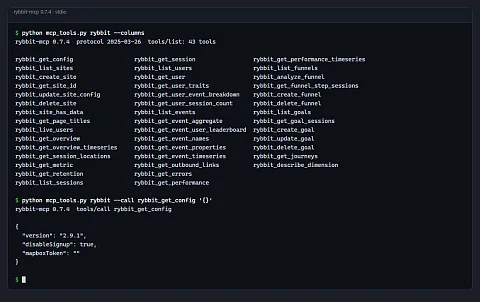
rybbit-mcp is an MCP server for Rybbit analytics that lets an AI assistant query traffic, errors, sessions and goals. To answer "how many people came from the newsletter today and how many of them reached the cart" in an analytics dashboard, you open the overview, set the period, add a source filter, switch to the funnel view and write the numbers down. rybbit-mcp lets you ask an AI assistant directly: Claude Code, Claude Desktop or any other MCP client uses it to read statistics, sessions, users, events, errors, page performance, goals and funnels from a self-hosted instance or from Rybbit Cloud, and answers with a sentence that has the numbers in it.
One question instead of clicking through the dashboard
Rybbit's web dashboard is built for browsing, not for combining. Comparing two periods, a breakdown by device and the errors from the last hour means going through several screens. The MCP server gives the model the same data as tools with documented parameters, and the model puts them together itself: first it looks up the site ID, then it fetches the overview, then a breakdown by dimension and finally the sessions behind the number. The result is an answer, not a set of browser tabs.
What the server does
- 43 tools in the released version 0.8.1: overview and time series, live visitors, breakdowns by dimension, retention, sessions and session detail, users and their traits, events, outbound links, errors, Core Web Vitals, funnels, goals, user journeys and site management. The README in the repository still describes an older set of 32 tools.
- Filters on 31 dimensions, such as browser, country, page, referrer, channel and all five UTM parameters, with eight comparison operators including regular expressions. The model can narrow the data as precisely as a person in the dashboard.
- Time range as a date range or relative in minutes ("last 60 minutes"). Time series go from one minute up to one year per bucket.
- Grouping events by any property and a leaderboard of users by the count of a given event. "Who sent the most messages today" is answered by one tool, not by manual counting.
- Write access where it makes sense: creating and deleting a site, changing tracking settings, saving a funnel and a goal. Tools carry hints that tell the client which ones only read and which ones change data.
- A check whether a site has received its first data. Useful right after deploying the tracking script or SDK.
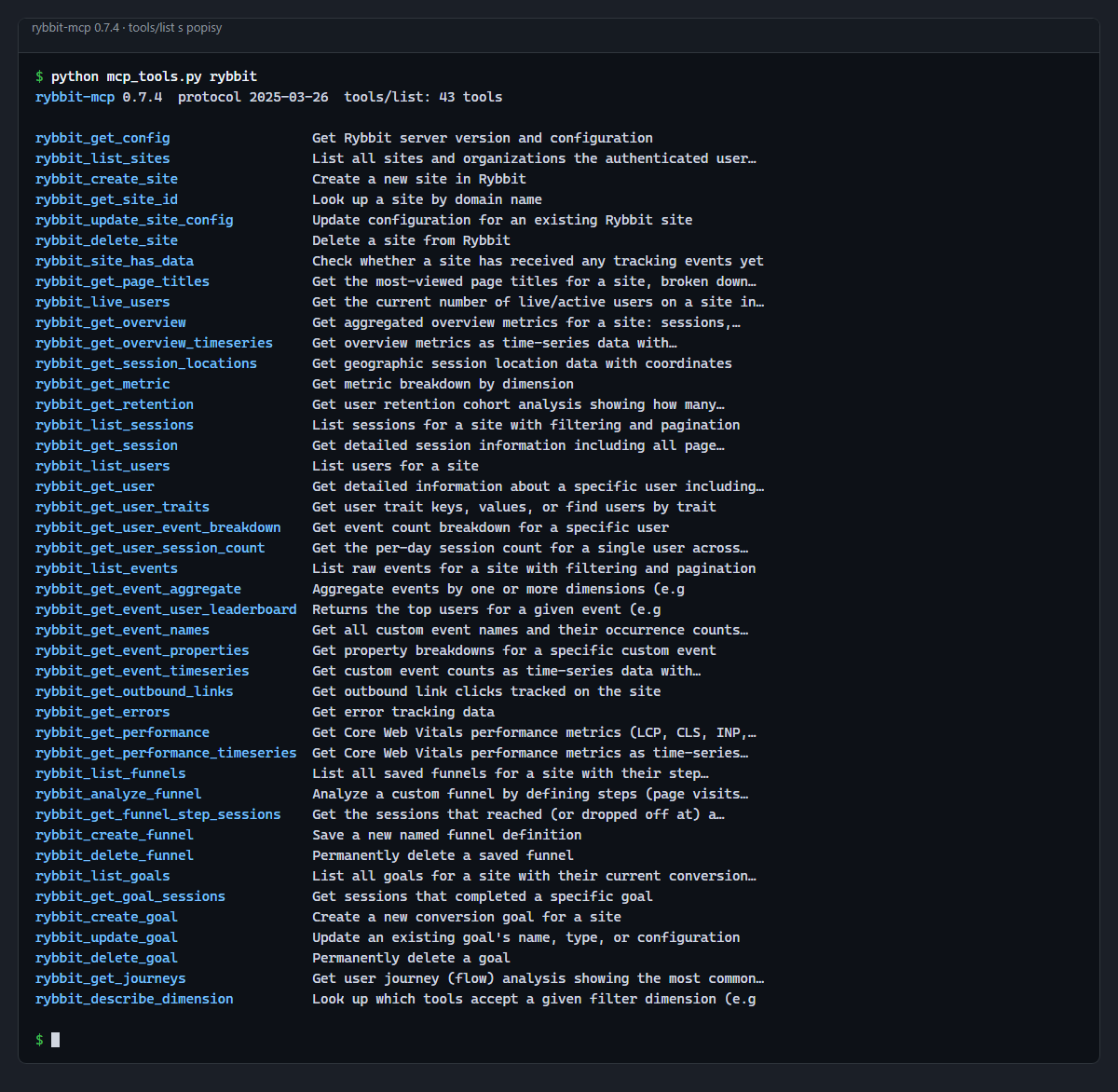
tools/list request.Responses that fit into the context
Analytics can return huge tables, and a language model has a limited context. The server therefore truncates any response over 25,000 characters, and every list supports paging with the page and limit parameters. Error messages are written for the model: instead of a bare code they say what to try next, for example narrowing the period or calling rybbit_list_sites for valid site IDs. The rybbit_describe_dimension tool lists which tools accept a given filter dimension, so the model does not have to guess.
How it connects
You can authenticate with an API key, which is the recommended option for production, or with an email and password for development. Both need the instance URL in RYBBIT_URL. By default the server runs over standard input and output as a child process of the client; with MCP_TRANSPORT=http it runs as a standalone HTTP service, with the address and port set by MCP_HTTP_HOST and MCP_HTTP_PORT. Versions 0.8.0 and 0.8.1 aligned paths, filters and responses with Rybbit server 2.6.
{
  "mcpServers": {
    "rybbit": {
      "command": "npx",
      "args": ["-y", "@nks-hub/rybbit-mcp"],
      "env": {
        "RYBBIT_URL": "https://your-rybbit-instance.com",
        "RYBBIT_API_KEY": "your-api-key"
      }
    }
  }
}
In Claude Code, one command does the same:
claude mcp add rybbit -e RYBBIT_URL=https://your-instance.com -e RYBBIT_API_KEY=your-key -- npx -y @nks-hub/rybbit-mcpWhere it helps
- Morning summary: yesterday's visitors, where they came from and which pages had the highest bounce rate, in one answer for all sites in the organisation.
- Post-deployment check: whether the first data arrived from a new site or app, which events come in and with which properties. Data is sent, for example, by the rybbit-ts library for the web and rybbit-flutter-sdk for Flutter.
- Sales funnel analysis: at which step people leave and what the sessions of those who left look like.
- Site performance: Core Web Vitals per page and how they change over time, when LCP or INP gets worse after a release.
To see the same numbers on a phone, use the Rybbit Mobile app, a mobile client for the same analytics.
Project status
The project started in March 2026 and thirteen versions have been published on npm since then, the latest being 0.8.1 from 24 September 2026. Rybbit is developed by a different team, so when it changes API paths or parameter validation, the server needs a new release; the last time this happened was with Rybbit 2.6. The repository has no automated test suite; CI on GitHub builds the project and publishes released versions to npm.
Getting started
You need Node.js 18 or later and an API key from Rybbit settings. The package does not need to be installed, npx downloads it on first run; npm install -g @nks-hub/rybbit-mcp installs it globally. To build from source, run npm install and npm run build.
Source code
The code is on GitHub in the nks-hub/rybbit-mcp repository under the MIT licence, written in TypeScript on top of the official MCP SDK. The package is on npm as @nks-hub/rybbit-mcp, latest version 0.8.1.