NKS AudioLink
Streams audio from a Windows PC to the sound card of a Linux machine on the local network over UDP. A WPF app, a command-line tool and an ALSA service.
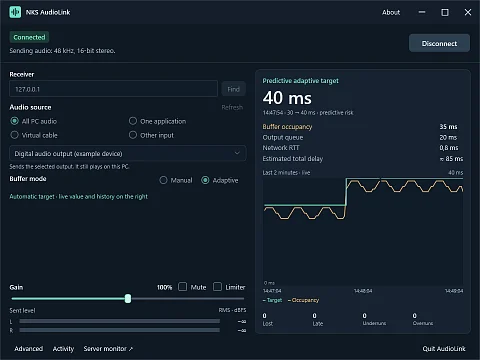
NKS AudioLink is a set of tools for streaming audio from Windows to Linux over UDP: a WPF app, a command-line tool and an ALSA service. The amplifier and speakers are plugged into a Linux computer that sits next to them and serves as, say, a home server. Music, films and calls, though, play on a Windows PC one room away. NKS AudioLink captures the sound in Windows, sends it over the local network, and the Linux machine plays it on its sound card. Linux needs no desktop environment, PulseAudio or PipeWire for this; ALSA and systemd are enough.
Why not Scream, Snapcast or VBAN
Several open projects can carry audio over a network, and each aims somewhere else. Scream installs a virtual sound card on Windows, which is a driver that needs administrator rights, and it can send to several receivers at once. Snapcast synchronises playback across rooms, but audio from Windows first has to reach one of its sources. VBAN with Voicemeeter is a mixing desk with virtual devices whose installation requires a restart. SonoBus connects several participants peer-to-peer for playing and recording together.
NKS AudioLink solves a narrower task: one Windows PC, one Linux receiver. The repository includes a comparison based on each project's documentation, checked on 23 October 2026. It did not measure the other projects' performance, latency or recovery, so it does not claim that any of them sounds better. These protocols are mutually incompatible and AudioLink cannot send to their receivers.
What the user gets
- No extra driver. It captures the whole sound card output through WASAPI, an interface built into Windows. The VB-CABLE virtual device is only an optional fourth mode and is installed separately.
- A single application. It can also capture one process with its child processes, such as a media player, while notifications from other programs stay on the PC. The default Windows audio output does not change. This mode needs an updated Windows 10 (2004 or later) or Windows 11 and has been tested on build 19045.
- A server without a screen. On Linux it runs as a systemd service under the unprivileged user
nks-audiolinkin theaudiogroup. It opens the sound card only when it accepts a session and releases it for other programs 5 seconds after the last packet. - The buffer sizes itself. You can pick 20, 40 or 80 ms manually; in automatic mode AudioLink keeps it between 20 and 100 ms depending on how packets arrive. It lowers it in 5 ms steps only after 30 seconds of clean playback and raises it after three confirmations that a dropout is imminent. In a ten-minute run on a real sound card it dropped from 40 to 20 ms within two minutes and stayed there.
- It reconnects on its own after an outage. After a server restart the client reconnected within five seconds, and after Windows woke from sleep in 11.72 s. It also handles a ten-second UDP outage. When the audio device fails, the client recreates the capture.
- You can see what is happening. The client shows buffer fill, network latency, lost and late frames, and stereo meters with clipping indication. It can mute the sound, turn on a peak limiter and copy diagnostics, from which it removes server, device and user identifiers as well as the shared key.
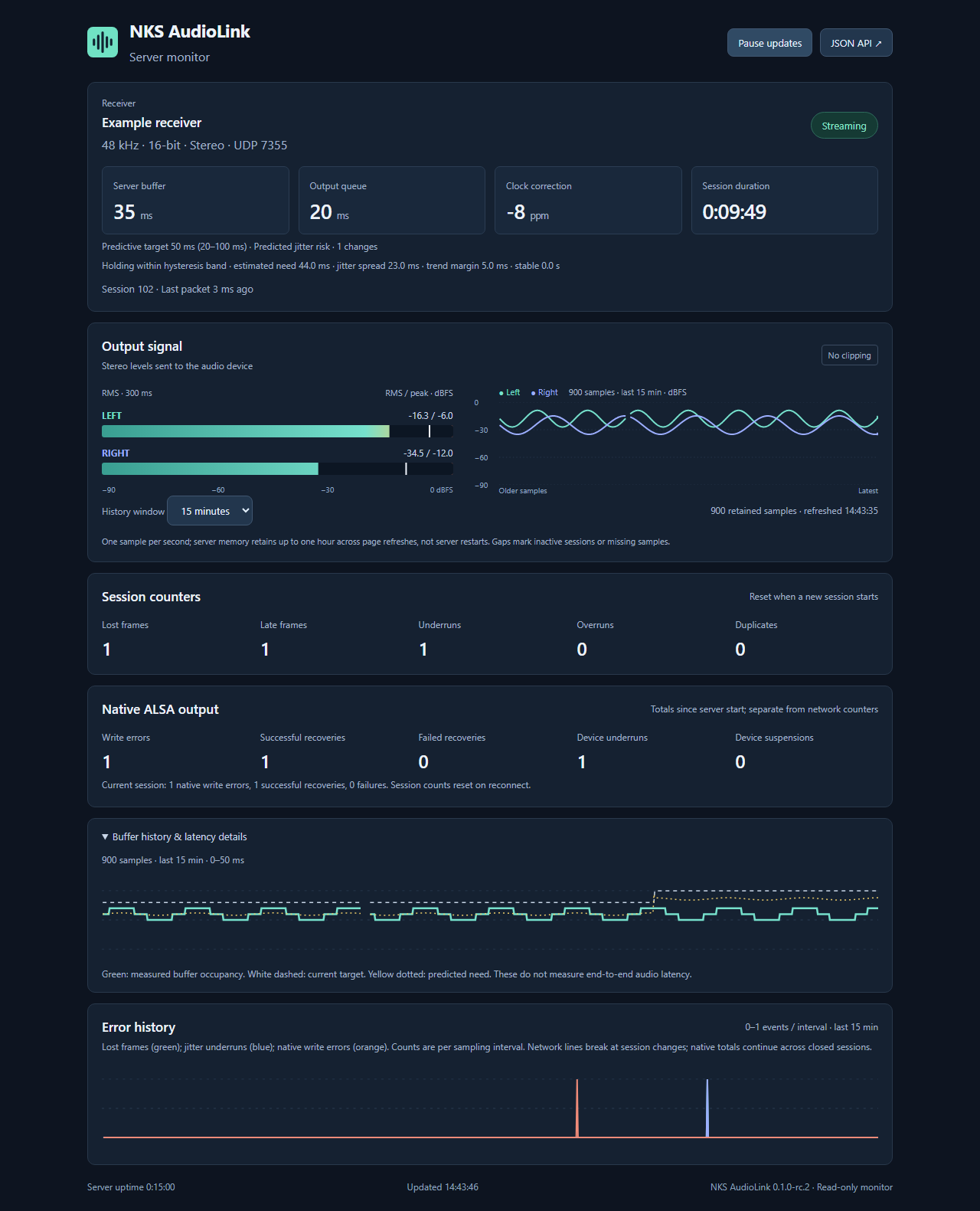
- The server costs almost nothing. In a ten-minute run with the automatic buffer and the web dashboard it used 1.548 % of one CPU core.
How the audio crosses the network
Audio is sent as uncompressed PCM, 48 kHz, 16 bits, stereo, in 5 ms frames. The server listens on UDP port 7355 and handles one session at a time; it rejects a second sender, which can take over explicitly. The client finds the server on its own by broadcasting a query to every network the PC is connected to. Every two seconds it sends a keep-alive message. The server continuously compensates for the clock difference between the two computers, and silent frames keep the audio timeline going while nothing is playing.
Source-to-speaker latency has not been measured physically. The application estimated 71 to 82 ms during operation, and one breakdown of the steps gives about 74 ms: 10 ms capture, roughly 15 ms client queue, 5 ms frame, a quarter of a millisecond network, 25 ms server buffer and 19 ms ALSA queue. The network leg alone, from sending in Windows to writing on Linux, has been measured: nine clicks took 22.96 to 37.88 ms, median 31.39 ms.
Where it fits
- A home server or small computer next to an amplifier that receives sound from a work PC.
- A sound card or converter that has Linux drivers but none for current Windows.
- A study where music from one player should go to speakers elsewhere, without mail and chat notifications.
NKS UsbShare also makes another computer's hardware available over the network: instead of a sound card it shares flash drives, phones and other USB devices.
What the server lets in
By default the server accepts only local connections and discards the audio. Before use on a network, the allowed addresses (allowCidrs) and the audio device are set in /etc/nks-audiolink/server.json. Packets can be signed with a shared key: each carries 16 bytes of HMAC-SHA256 and the server silently drops a packet without a valid signature. The audio is not encrypted, though, so AudioLink belongs on a trusted local network or a VPN.
The web dashboard is optional, read-only and listens on 127.0.0.1:7356 by default. It has no login and no TLS, so it is exposed to another network through an SSH tunnel or on a specific local network address. It never returns the shared key, and the client does not store the key in its settings file.
Project status
The current version is release candidate 0.1.0-rc.3 from 23 October 2026, marked as a pre-release on GitHub. It passed 171 portable tests, 57 Windows client tests, 16 web dashboard tests and 36 package tests; the tests cover 96.52 % of core lines. Two manual checks remain before the 0.1.0 release: assessing audio-to-video sync and physically unplugging the network cable. The format is fixed at 48 kHz and 16-bit stereo. AudioLink has no multi-room playback and does not interoperate with other protocols.
Download
Portable packages are in GitHub Releases, together with a checksum file. The Windows x64 archive (127 MB) contains the NksAudioLink.App.exe application and the command-line tool; the Linux x64 archive (43 MB) contains the server and an install script. Both bundle the .NET 9.0.20 runtime. The Windows application needs Windows 10 or later, stays in the notification area after its window is closed and can start at sign-in. AudioLink is not in any app store.
sh deploy/linux/install.sh ./NksAudioLink.Server
# edit /etc/nks-audiolink/server.json: sink, allowCidrs, pskBase64
systemctl enable --now nks-audiolink
On Windows you then enter the server address in the application or use the Find button, choose a source and press Connect.
Source code
The code is at github.com/nks-hub/nks-audiolink under the MIT licence, written in C# on .NET 9. The NAudio library, which the client uses to capture audio, has its own MIT licence. Building from source needs .NET SDK 9.0.203 or a later 9.0 release.