NKS Task Manager
NKS Task Manager is a process and system monitor for Windows 10 and 11 with a C#/WinUI 3 Native AOT interface and a C++20 core: processes, performance, services, users, hardware and startup without admin rights.
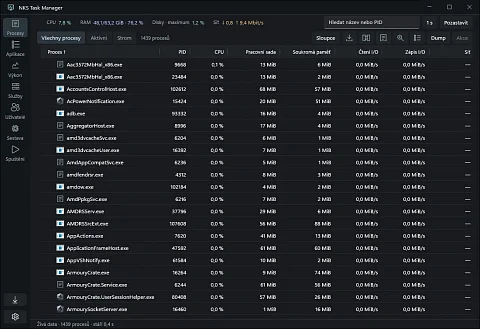
NKS Task Manager is a process and system monitor for Windows 10 and 11. The interface is written in C# and WinUI 3 and compiled with Native AOT; measurements and process actions are handled by a C++20 core. It is for administrators and developers for whom the built-in Task Manager is not enough: they want to see a process's handles, modules and memory map, disk health from SMART, which process moves network traffic, or take a dump. It does all of this in one window and needs no administrator rights for normal work.
Seven views in the left bar
- Processes as a table, a tree or application groups. Search by name or PID, sorting, reordering and hiding columns, tree branch totals and process details: threads, modules, memory map, handles and file signatures.
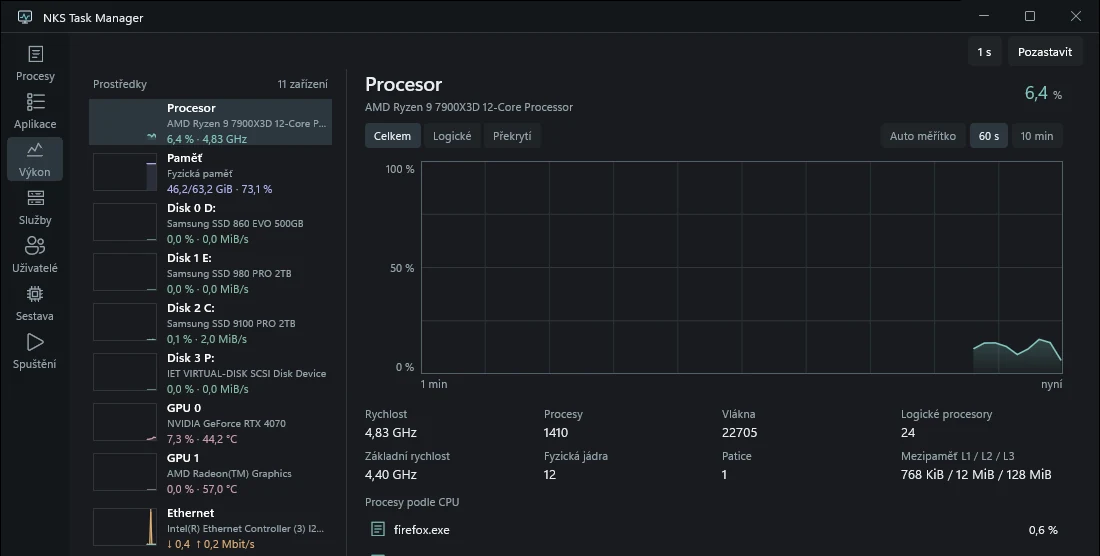
- Performance with a graph for each logical processor and the CPU speed in GHz, memory, the pagefile, disks including SMART and NVMe health, GPU engines and memory, and network adapters with totals since start. Tiles in the resource list show one extra value next to the load, such as CPU speed, memory in use or GPU temperature.
- Services with state filters, accounts, dependencies and shared host processes. Start, stop and restart show the plan in advance, including dependent services.
- Users with logged-on sessions and their resource use, disconnect, log off and send message.
- Hardware with CPU topology and caches, memory slots and speed from SMBIOS, motherboard, BIOS and UPS.
- Startup with items from the Run keys and Startup folders, their publisher by signature, and disabling current-user items the same way Windows does.
- Applications with windows grouped by owner; packaged applications are told apart from the processes that draw their frame.
The graphs share one cursor. A click pins a moment, Shift selects a range, and the Processes at time button shows what was running then. Refresh runs every second or every 250 ms, and a graph holds 60 seconds or 10 minutes.
The interface is in Czech, English, German, Slovak and Polish. The language follows the Windows setting and can be changed in the application settings; the change applies after a restart.
A process is recognised even after its PID is reused
Windows hands out a PID again as soon as a process ends. Ending a process by a number seen a second ago can hit a different program. NKS Task Manager therefore identifies a process by the 128-bit boot identifier, the PID and a generation. Actions such as end, end tree, suspend, priority, affinity, CPU Sets or dump are checked against the same process on the same handle before they run. The helper refuses system, protected and critical processes and processes of another user or session. Ending a tree keeps a plan of at most 256 processes and lists the ones it did not reach separately.
A value that could not be read is shown as unavailable, never as zero. This applies to denied access to a protected process as much as to a disk that does not report SMART.
A C++ core and helpers in separate processes
Measurement is done by the native library nks-monitor.dll with its own C ABI; the interface takes snapshots from it, plus batches of added, changed and removed processes. Nine separate helper programs handle process, device and service collection, icons, details, process and service actions, dumps (for x64 and WOW64), administrator actions and updates. Apart from the broker for administrator actions they run with the user's rights, and each collector runs in its own Windows Job with a 256 MiB memory limit. An icon read that does not answer within three seconds is ended and the helper restarted; process details have a five-second deadline and can be cancelled.
Process enumeration and the NT API declarations come from System Informer, pinned to a specific commit; its licence is in third_party/phnt. The rest of the code is ours.
When run as administrator, the application records ETW events: process start and stop and the attribution of disk and network transfers to processes. Features that need administrator rights offer a Restart as administrator button; after the UAC prompt the application opens again in the same view.
Installed for all users into Program Files, NKS Task Manager can replace the system Task Manager. It registers through Image File Execution Options, so every start of taskmgr.exe opens NKS Task Manager. Turning it on and off takes one UAC prompt, so it works in an unsigned build as well. Turning it off or uninstalling removes the registration.
What the application sends and stores
Nothing goes over the network except two optional things: reading the CPU temperature from an already running LibreHardwareMonitor-compatible program on 127.0.0.1:8085 (off by default) and crash reports through Sentry, but only in a build given a DSN at compile time. Without one, the SDK is not included at all. A JSON snapshot export leaves out process and device names by default; command lines, arguments and accounts are never exported. Two snapshots can be compared in a separate window.
In the screenshots
The screenshots were taken on 7 November 2026 with the application running without administrator rights. The Performance view is from the released version 0.2.4. The Processes view at the top is from a build from source (commit 411cbeb) with the fix for a crash that ended versions 0.2.3 and 0.2.4 when started straight into the Processes, Applications or Users view; the fix shipped in version 0.2.5. It shows 1,439 live processes and the top bar with CPU, RAM, disk and network load.
Project status
The project is in development. The first release, 0.1.0, came out on 6 November 2026, followed by the 0.2 series: the interface translated into four more languages, Task Manager replacement without a signed helper, CPU speed and a more compact Performance view. Each release has an installer and a portable ZIP. The installer needs no administrator rights and installs into the user's profile; a choice at start or the /ALLUSERS switch installs it for all users into Program Files. The builds are not signed, so SmartScreen asks on first start, and the elevated broker for administrator actions and the updater stay disabled; both require a build signed with a certificate whose key the helpers pin.
TODO.md tracks the performance targets openly. In the latest measurement on Windows 11 in a virtual machine with 10 logical processors, the Processes view used 0.48 to 0.54 % of the whole machine's CPU in the foreground and 0.15 to 0.20 % minimised; the targets are 0.5 and 0.1 %, so the foreground sits at the limit and the minimised state is above it. Private memory of the application and all its helpers peaked at 144 MiB against a 220 MiB limit. Older packages also passed tests on physical Windows 10; newer batches are verified mainly on Windows 11 in a virtual machine. A 24-hour run and the acceptance of the visual design are still open.
All 32 native tests passed in the build on 6 November 2026. The application also has a --smoke switch, which goes through the views, process selection, the PID filter and services and exits with code 0 when everything checks out.
Getting started
The installer and the portable ZIP are in the GitHub releases; Windows 10 or 11 x64 is required. A view can be opened directly with a switch, for example --view=services. Building from source needs Visual Studio 2022 with the C++ tools, Windows SDK 10.0.26100.0, CMake 3.31, PowerShell 7.2 and .NET SDK 10.0.403:
pwsh -NoProfile -File scripts/build.ps1 -Configuration Release -WinUI -Test
./build/winui-aot/NksTaskMgr.WinUI.exe
Source code
The code is in the nks-hub/nks-taskmgr repository under the MIT licence. docs/architecture.md describes how the views, helpers and native API work, and docs/testing.md lists the tests and benchmarks.