nksweb-mcp
MCP server for the NKS Web CMS: articles, pages and settings across all its websites from an AI agent. TypeScript, MIT licence.
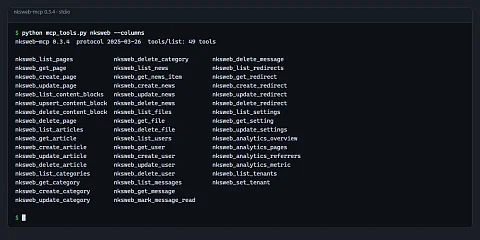
nksweb-mcp is an MCP server that lets an AI assistant manage content on websites running on the NKS Web CMS. Anyone who manages content on several websites repeats the same steps in the admin over and over: find a page, edit a text block, create an article, add a redirect after a URL change, check the traffic. nksweb-mcp hands these tasks to an AI assistant: through it, Claude Code or any other MCP client reads and changes pages, articles, categories, news, files, users, contact form messages, redirects, settings and analytics, on every site the key has access to.
From a sentence straight to the admin
The editor does not need to know where things are in the admin. They say "add a redirect from the old price list URL to the new one" or "which pages had the most visits this month", and the model calls the matching tool with the right parameters. Compared with writing scripts against the REST API, there is no documentation to study and no error handling to write; compared with clicking by hand, there is no switching between screens and between sites.
What the server does and what it is for
The content of a whole site in 49 tools
Pages, articles, categories, news, redirects and users have a full set of list, detail, create, update and delete tools. Files, messages and settings get the tools that make sense for them: a file can be listed, shown and deleted, a message marked as read. Pages can be filtered by type, status and language, and searched by title, URL and HTML content. Pages are soft-deleted, so the database record stays.
Editing one block instead of the whole page
Pages in the admin are made of named HTML blocks edited in the Quill editor. The server can work with them one at a time: changing the heading at the top of a page means sending one block, not rewriting the whole content and risking damage to the rest.
Several sites with one key, but never by mistake
The system is multi-tenant, and one API key can have access to several sites. The nksweb_set_tenant tool switches the context, and all further requests go to the selected site via the X-Tenant header. When a key can see more than one site, the server does nothing until the model explicitly selects one. An edit therefore cannot land on a different site than the one the user meant.
Permissions by key scope
Each tool requires a matching API key scope, for example pages:read, articles:write or analytics:read. A key for an assistant that only answers questions about traffic cannot delete anything. Tools also carry the MCP hints readOnlyHint, destructiveHint and idempotentHint, from which the client can tell what only reads and what changes data, and it can ask for confirmation before deleting.
Traffic without another tool
Four analytics tools return an overview of sessions, pageviews, users and bounce rate, the most visited pages, traffic sources and a breakdown by 14 dimensions, including country, browser, device and UTM parameters. Without a specified period they use the last 30 days.
Errors the model understands
Status codes 400, 401, 403, 404, 409, 429, 502 and 503 have their own message that names the cause, such as a missing key scope. A list longer than 25,000 characters is cut to half its items with a note telling the model to page through it; other responses are truncated to 25,000 characters. A request without a response within 30 seconds ends with an error.
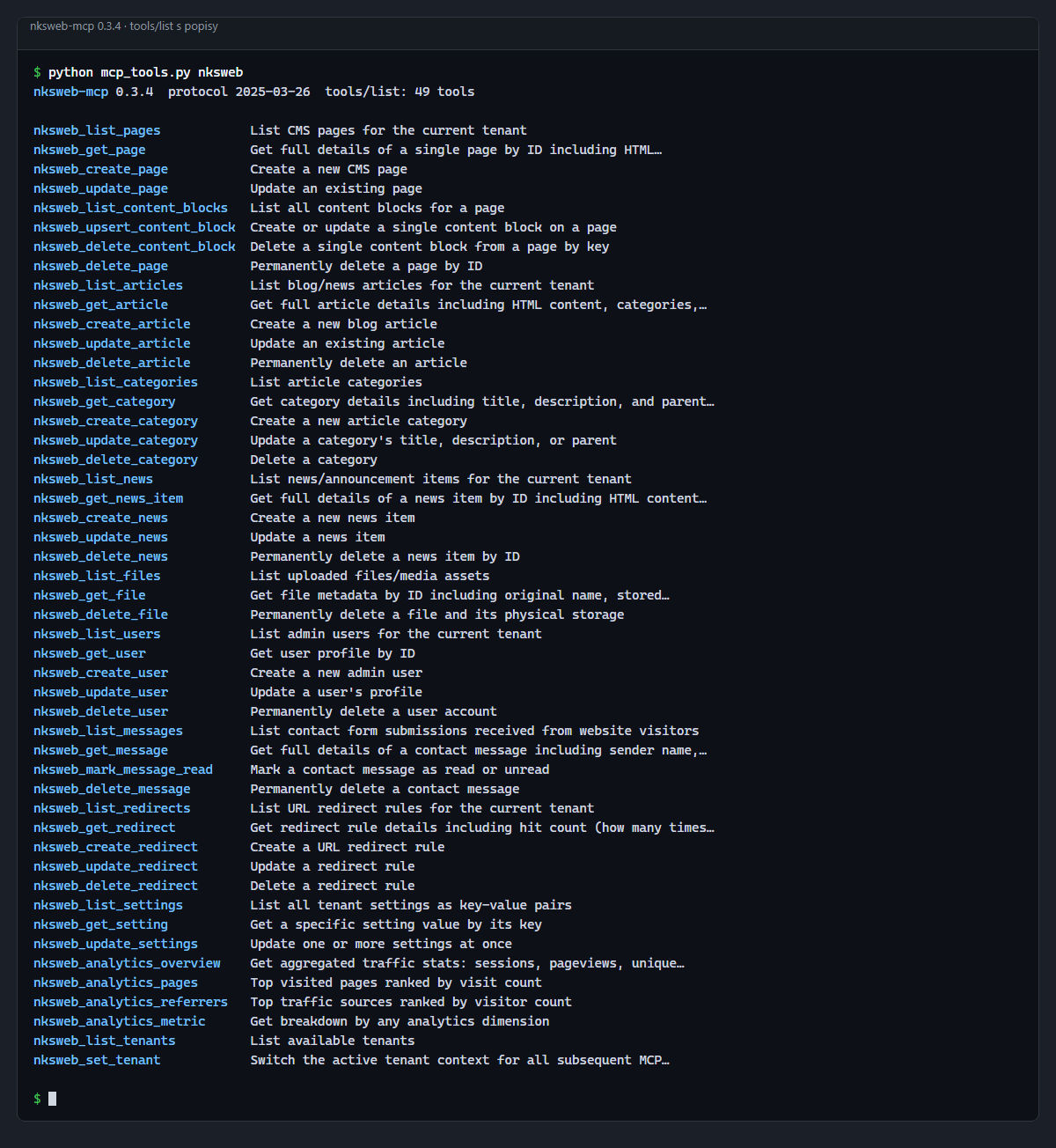
tools/list request.How to set it up
{
  "mcpServers": {
    "nksweb": {
      "command": "npx",
      "args": ["-y", "@nks-hub/nksweb-mcp"],
      "env": {
        "NKSWEB_URL": "https://your-site.com",
        "NKSWEB_API_KEY": "nks_your_api_key"
      }
    }
  }
}
All it needs is the site URL and an API key with the nks_ prefix and the scopes for the tools the assistant should use. The assistant then works like this:
User: "Update the hero heading on homepage"
→ nksweb_upsert_content_block { pageId: 14, key: "hero_heading",
    content: "Digital Solutions That Work", label: "Hero Heading" }

User: "Add a redirect from /old-page to /new-page"
→ nksweb_create_redirect { source: "/old-page", target: "/new-page",
    statusCode: 301, isActive: true }
Where it helps
- Editorial work: the assistant creates a draft article with categories and search engine metadata from a brief, and the editor only reviews and publishes it.
- Cleanup after a site restructure: a batch of 301 redirects at once, without filling in the form for each one.
- Monthly report: traffic, most read pages and traffic sources for all sites the key has access to, in one answer.
- Contact form management: listing unread messages and marking them as handled.
Project status
The server started in March 2026. npm has version 0.2.3 from 22 March 2026, which added paging for lists. The repository is further ahead: in May it gained an HTTP mode, in which the server runs as a standalone service, and structured outputs with a schema for all tools. These have not been published on npm yet; to use them, build the server from source. The repository contains an integration test that is run manually against a running instance of the system with its own API key.
Getting started
npx -y @nks-hub/nksweb-mcp
# or in Claude Code
claude mcp add nksweb -e NKSWEB_URL=https://your-site.com -e NKSWEB_API_KEY=nks_key -- npx -y @nks-hub/nksweb-mcp
You need Node.js 18 or later and a site on NKS Web with the API enabled. To build the server from source, run npm install and npm run build, then run node build/index.js instead of npx in the configuration.
Source code
The code is on GitHub in the nks-hub/nksweb-mcp repository under the MIT licence, written in TypeScript on top of the official MCP SDK. The package is on npm as @nks-hub/nksweb-mcp, latest version 0.2.3.